





How to Run AI Agents for Marketing
The complete marketing agent stack: MCP connections to Meta, TikTok and X ads, AI creative pipelines with Higgsfield and Kling, a machine-readable brand kit, triggers and schedules, and the kill/scale rules of a real performance loop.
Marketing teams were among the first to use AI for writing — and among the first to notice that a chat window only gets you so far. Pasting briefs into a chatbot and copying the answers back out is still manual work; it just moved the typing around. And it touches none of the places where performance marketing actually lives: the ad accounts, the creative pipeline, the numbers.
AI agents change that, but only if you build them a stack, not a prompt. An agent that can read your Meta spend, draft TikTok variants against your brand kit, brief a video generation run, and flag the ad set that just blew past 3x target CPA — that is a different machine from "write me five hooks." This guide covers that machine end to end: the platform connections, the creative tools, the brand system, the triggers, the performance loop and the guardrails. It is long because the setup is real. Budget a few evenings, not an afternoon.
Copy & paste
Start here: plan it with AI
Copy this prompt into any LLM or coding agent (Claude, ChatGPT, Cursor …) to apply this guide to your own project.
Guide: https://blackcard.dev/guides/how-to-run-ai-agents-for-marketing
Markdown version (fetch this for the full method): https://blackcard.dev/guides/how-to-run-ai-agents-for-marketing.md

I want to set up an AI agent stack for performance marketing, following the guide "How to Run AI Agents for Marketing" from blackcard.dev.

The stack has five parts: an agent (brains), MCP/skill connections to ad platforms and creative tools (hands), a machine-readable brand kit (memory), triggers and schedules (heartbeat), and a performance loop with explicit kill/scale rules (eyes). Connections start read-only; every write lands as a PAUSED draft; a human stays on spend and publish.

Interview me one question at a time before proposing anything:
1. Which ad platforms do I run, and at what monthly spend per platform (Meta, TikTok, X, Google, LinkedIn)?
2. What is my primary KPI and target (CPA, ROAS, CPL) per platform?
3. What creative do I run today (static, video, UGC), who makes it, and which AI generation tools do I already pay for (e.g. Higgsfield, Kling, a Flux/Midjourney-class image tool)?
4. Do I have a written brand guide — voice rules, palette hex values, logo rules, banned claims?
5. Where does my team live day to day (Slack, email, Teams) for approvals and alerts?
6. Who reviews creative, and who is allowed to touch budgets?
7. What does reporting look like today, and what numbers does nobody trust?

Then produce: (a) a stack plan naming each component and its connection type (read-only MCP, draft-write MCP, API wrapper, skill), (b) the brand-kit sections I must write before any agent runs, (c) a 30-day rollout in four weekly stages ending with draft-level campaign writes, and (d) the three guardrails you will refuse to relax: human-on-spend, human-on-publish, platform-level budget caps.
A stack, not a chatbot
A working marketing agent setup has five parts. Miss one and the whole thing degrades back into a chat window.
- The agent — brains. The model plus its standing instructions. It plans multi-step work: read the numbers, compare against rules, draft the outputs, queue them for review.
- Connections — hands. MCP servers and skills that let the agent read ad accounts, create paused drafts, trigger creative generation and post reports into Slack. Without hands, every insight ends as "now a human retypes this somewhere."
- The brand system — memory. A machine-readable brand kit the agent loads on every run: voice, visual rules, post anatomy per channel, banned claims. This is what keeps output from 50 runs looking like one brand instead of 50 freelancers.
- Triggers and schedules — heartbeat. Agents do not run themselves. A scheduler and event hooks decide when they wake up: Monday 07:00 for the report, on every new blog post for repurposing, on a CPA breach for an alert.
- The analytics loop — eyes. Daily and weekly checks against explicit kill/scale thresholds, structured creative tests, and a report a human actually reads.
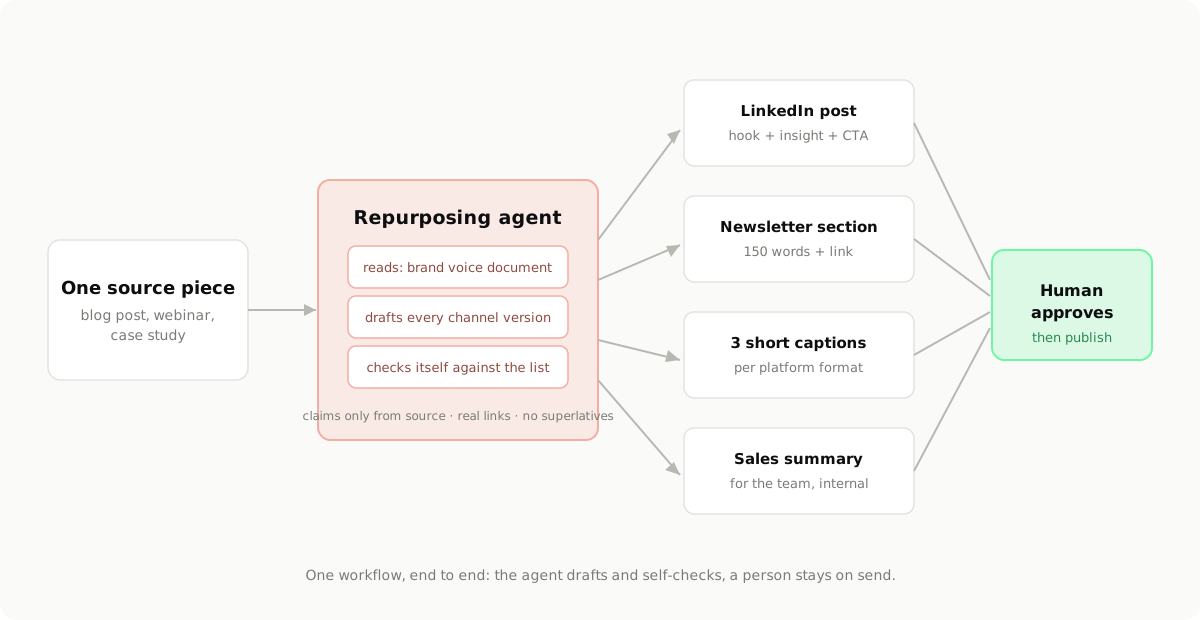
The diagram shows the simplest member of the family — the repurposing agent. Everything below extends the same pattern to ads: grounded inputs, self-checks against written rules, and a human gate before anything goes public or spends money.
Connecting the ad platforms: MCPs and skills
The single biggest upgrade over chat-window AI is giving the agent governed access to your ad accounts. The clean way to do that is an MCP server per platform — a small service that exposes exactly the operations you allow and nothing else. (If MCP is new to you, read How to Build an MCP Server first; an ad-platform MCP is the same pattern pointed at a marketing API.)
Read-only first
Your first version exposes only reads:
list_campaigns— campaigns, ad sets, ads, their status and objectivesget_performance— spend, impressions, CPM, CTR, CPA/ROAS, frequency per ad set, by date rangeget_creative— which creatives run where, with launch datesget_pacing— month-to-date spend against budget
That alone powers the reporting agent, the spend check and the fatigue detection — most of the daily value — at zero risk. You cannot burn budget with a read.
Then draft-level writes
Once reads are boring and trusted, add writes with one non-negotiable property: everything the agent creates lands PAUSED.
create_campaign_draft— new campaign/ad set/ads, created in paused stateupload_creative— push an approved asset into the ad account's librarypropose_budget_change— writes a recommendation record; a human applies it, or approves the agent applying it
Never give an agent enable_campaign or an unconstrained budget mutation. The failure mode is not malice; it is a model misreading a column at 2 a.m. and scaling the wrong ad set. Paused drafts turn that into a non-event you review over coffee.
The platform specifics, at pattern level
Every major platform works roughly the same way, with different paperwork:
- Meta Marketing API — you register an app, go through app review for ads permissions, and use a system-user token scoped to specific ad accounts. Use a sandbox ad account for development. Assign the integration the lowest ad-account role that works.
- TikTok Ads API — developer app, OAuth against the advertiser account, sandbox mode available. Same rule: a dedicated access role, not somebody's personal login.
- X Ads API — access is application-based and takes longer to get; plan for that in your rollout.
- Google Ads and LinkedIn — both have mature APIs with developer-token processes; the integration shape is identical even when the vocabulary differs.
In all cases: tokens live in a secrets store, never in prompts or repos; each MCP logs every call with arguments; and the ad-platform role granted to the integration is the least-privilege one that supports the exposed tools.
Skills: packaged expertise the agent loads
Connections are hands; skills are trained reflexes. A skill is a packaged instruction set the agent loads for a specific job — so the knowledge lives in a versioned file, not in whoever wrote the longest prompt. Typical marketing skills:
write-ad-copy— per-platform character limits, hook patterns, banned claim patterns, CTA rulescreative-brief— how to turn an angle + audience into a brief for the generation pipelineweekly-report— exactly which metrics, in which order, with which thresholds flagged
One example, in full:
# skill: write-ad-copy  (v4 — owner: marketing lead)
purpose: Draft paid social copy from an approved brief. Output drafts only.
inputs: brief (angle, audience, offer), brand-kit.yaml
rules:
  - Load brand-kit.yaml first; its voice and banned-claims sections override everything here.
  - Primary text: Meta max 125 chars before truncation; TikTok 100; X 280 total.
  - Headlines: Meta 40 chars, 5 variants per ad, no two with the same first word.
  - Every claim must trace to the brief or the product page. No invented numbers,
    discounts, or testimonials — if the brief lacks proof, write around it.
  - One CTA per ad, from the brand kit's approved CTA list.
  - Never use: "guaranteed", "best in the world", "#1", urgency that is not real.
output: variants grouped by platform, each tagged with angle + hook type,
        followed by a self-check line confirming limits and claims were verified.
Keep skills in version control. When copy quality drifts, you fix the skill once — not re-explain it in every chat.
The creative pipeline: AI image and video generation
Paid social eats creative. Frequency climbs, CTR decays, and the account that wins is usually the one that tests more variants, not the one with the cleverest single ad. This is where generation tools earn their keep — if the agent orchestrates them inside a pipeline instead of someone typing prompts ad hoc.
The tools, by job
- Video: Higgsfield and Kling AI generate short-form motion — product shots, scene transitions, stylized b-roll — the raw material of Reels/TikTok ads. Treat them as rendering engines driven by templated prompts.
- Images: a Flux- or Midjourney-class model covers statics and thumbnails; Krea-style tools shine when a designer wants real-time iteration on a direction before the pipeline mass-produces variants.
- Voice: an ElevenLabs-class tool for VO on videos that need narration.
The integration pattern is the same for all of them, whether you call an official API or wrap one in a thin MCP: the agent submits a job from a template, the job runs async, the asset lands in your asset store, and it enters a review queue. Nothing goes from a generation tool straight into an ad account. Ever.
Templates bound to the brand kit
Freestyle prompting produces assets that look like the tool, not like you. The fix is a prompt template that pulls its constants from the brand kit:
# creative-gen template: product-video-hook (9:16)
Generate a [duration]s vertical video, 9:16, for [product].

Concept: [hook angle from brief — e.g. "problem shown in first second,
product enters as the fix"]

Visual rules (from brand-kit.yaml — do not improvise):
- Palette anchored on [primary hex] with [secondary hex] accents;
  backgrounds stay within [neutral hex range]
- Clean, high-key lighting; no lens-flare cliches, no stock-footage look
- Logo appears only in the final 1.5s, lower third, respecting
  [logo clear-space rule]; never animated or distorted
- Keep top 10% and bottom 15% of frame free of key content
  (platform UI covers these zones)

Pacing: the hook lands inside the first 3 seconds; one message total;
end on [CTA] as on-screen text in [type style].
The agent fills the brackets from the brief; the brand constants come from one file. Change the palette once, and every future render follows.
Specs the pipeline enforces
Bake the platform specs into the pipeline as hard checks, not as things people remember:
- Aspect ratios: 9:16 for Reels/TikTok/Shorts, 1:1 or 4:5 for feed, 16:9 where it still matters
- Safe zones: keep headlines and product out of the zones platform UI covers (roughly top 10%, bottom 15% on vertical)
- Hook timing: the first 3 seconds decide the view; a variant whose hook lands at second 5 is a variant you did not test
- Durations: 6–15s for most paid placements; render a 6s cutdown of everything
And name assets so humans and agents can trace them: [campaign]_[angle]_[format]_[variant]_[date] — e.g. q4launch_timesaver_916_v3_1102. When the performance loop says "v3 beat v1 by 40%", the name tells you exactly what v3 was.
The review gate
Every generated asset passes a human before it touches an ad account — checked for brand (does it pass the kit?), claims (does the visual imply something the product does not do?), and platform policy. In practice this is a 10-minute daily skim of a review queue in Slack or a shared board. Approval moves the asset to the library; the upload tool only accepts approved assets. That single gate is what lets you run the generation volume without waking up to a brand incident.
The brand system the AI follows
Agents are consistent exactly to the degree that your brand rules are written down. A PDF brand book does not count — the agent needs a machine-readable brand kit it loads on every run. If you have a brand guide already, this is a conversion job; if you do not, write it first — How to Build a Brand Guide is the method, and the kit below is its machine-readable twin.
# brand-kit.yaml  (v7 — single source of truth for all marketing agents)
voice:
  rules:
    - Plain and direct. Short sentences. No hype words.
    - We talk about the reader's work, not about ourselves.
  words_we_use: [practical, built, works, clear, less busywork]
  words_we_never_use: [revolutionary, game-changing, unleash, supercharge]
  sounds_like: "Your team spends 7 hours a week retyping bookings. Stop."
  not_us: "Unleash the revolutionary power of next-gen automation!"

visual:
  palette: { primary: "#FF6634", ink: "#0E0E10", paper: "#FAFAF8" }
  type: { display: "Outfit", mono: "IBM Plex Mono" }
  logo: { clear_space: "1x logomark height", min_size_px: 24,
          never: [stretch, recolor, animate, place on busy imagery] }

post_anatomy:
  tiktok:  { hook: "first 3s, problem-first", body: "one message",
             cta: "verbal + end card", hashtags: "2-3 niche, no #fyp" }
  meta_feed: { hook: "first line before fold", body: "max 125 chars primary",
               cta: "one button CTA", hashtags: "none" }
  linkedin: { hook: "claim or number", body: "4-6 short lines",
              cta: "comment or link", hashtags: "max 3" }

compliance:
  never_claim: ["guaranteed results", "cheapest", "medical or financial outcomes"]
  always: ["pricing claims trace to the current price page",
           "testimonials are real, attributed, and on file"]
Three details make this work in practice. The on-brand/off-brand pairs teach tone faster than any adjective list — include at least three. The per-channel anatomy stops the agent from posting LinkedIn essays to TikTok. And the compliance block is load-bearing: it is the difference between an embarrassing draft and a regulatory problem. Version the file, give it an owner, and make every skill declare that the kit overrides it.
Triggers and scheduling: the heartbeat
An agent without triggers is a demo. There are exactly three trigger types; a mature setup uses all of them.
Schedule-based. The backbone:
- Monday 07:00 — the weekly report agent compiles the performance summary (sample below) and posts it before standup.
- Daily 08:00 — the spend-check agent compares yesterday's spend and CPA per platform against pacing and thresholds; silence if all green, a short alert thread if not.
- Thursday — the testing agent summarizes which creative tests reached significance and queues next week's briefs.
Event-based. The leverage:
- New blog post published → repurposing agent drafts the channel versions into the review queue.
- CPA breaches threshold intraday → alert with context: which ad set, spend so far, the trend, and a recommended action — not just a number.
- Creative fatigue signal (frequency or CTR rule fires) → agent drafts three new briefs from the winning angle and queues them.
On-demand. A human asks in Slack: "how is the Q4 launch pacing against plan?" and gets an answer grounded in the actual account data, because the reads go through the same MCPs.
Wiring this is a scheduler problem, not an AI problem: a cron-style scheduler or an n8n workflow calls the agent with the task and delivers the output to Slack or email, with approval buttons where a decision is needed. The rule that keeps the whole thing safe: every automated path ends at a human whenever money or publishing is involved. The agent prepares; a person pulls the trigger. You lose a few minutes of latency and keep your budget and your brand.
The performance loop: where the money is
Everything above exists so this loop can run. An agent that reads the numbers daily, judges them against written rules, and turns the conclusions into actions — briefs, pauses to propose, budgets to recommend — is the part of the stack with direct P&L impact.
What the agent checks
Daily (5-minute pass): spend pacing per platform against monthly budget; CPA or ROAS per active ad set against target; any ad set spending with zero conversions; frequency creeping on top spenders; delivery anomalies (an ad set suddenly spending 3x its usual hour-by-hour pattern).
Weekly (the Monday report): week-over-week CPM, CTR, CPA/ROAS movements per platform; creative leaderboard by angle, not just by ad; test results that reached minimum spend; fatigue candidates for the next refresh cycle; pacing projection for the month.
The metrics that matter for paid social: spend pacing, CPM (what attention costs), CTR (does the creative stop anyone), CPA or ROAS (the only score that pays rent), frequency (how burned the audience is), first-3-seconds view rate on video (is the hook working), and post-click signals — landing-page conversion, time to first action. The ones to ignore: impressions as an achievement, likes, follower counts, and any "engagement rate" that bundles them. An agent reporting vanity metrics with confidence is worse than no agent.
Kill and scale rules, in writing
The agent applies rules you wrote while calm — which is exactly why they work better than 11 p.m. judgment calls:
# performance-rules.txt (v3 — reviewed monthly, owner: performance lead)
KILL (propose pause):
- spend > 3x target CPA with 0 conversions            -> propose pause
- CPA > 2x target over 3 consecutive days             -> propose pause
- CTR < 0.4% after 2,000 impressions (feed placements)-> propose pause

SCALE (propose budget change, +20% max per step):
- ROAS > target for 3 consecutive days AND frequency < 2.5
- never scale by more than 20%/day (resets learning), never twice in 24h

REFRESH CREATIVE (auto-brief 3 variants of winning angle):
- frequency > 3.5 on an active ad set
- CTR drops > 30% from its own 7-day peak

TESTS:
- one variable per test (hook OR visual OR audience — never two)
- 3-5 variants, minimum spend of 1x target CPA per variant before judging
- declare a winner only on the primary KPI, not on CTR alone
Tune the numbers to your account — a €200/day account and a €20,000/day account breathe differently — but have numbers. "Propose", not "do": the agent attaches the rule that fired and the data behind it, and a human clicks approve.
Attribution honesty
Platform-reported conversions overcount — every platform grades its own homework, and overlapping campaigns happily claim the same purchase twice. The agent should report platform numbers for optimization (they are directionally useful within a platform) and blended numbers for truth: total marketing spend against total new revenue, from your own dashboard, not from any ad manager. Sanity-check incrementality occasionally — pause a retargeting campaign for a week and watch whether "its" conversions actually disappear. An agent that quietly mixes attribution frames in one report will mislead you with perfect formatting; make the frame explicit in every report block.
What Monday morning looks like
WEEKLY PAID REPORT — Mon 07:00 (data: Mon-Sun, platform-reported)
Spend: €4,120 of €18,000 Nov budget — pacing 101% ✓
Meta:   €2,610 | ROAS 3.4 (target 3.0) ✓ | CPM €7.90 (+6% WoW)
TikTok: €1,180 | CPA €11.20 (target €12) ✓ | CTR 1.31% (-4% WoW)
X:      €330   | CPA €19.40 (target €15) ✗ | 3rd week over target

RULES FIRED:
- SCALE: meta/q4launch_timesaver — ROAS 3.9 x3 days, freq 2.1
         -> proposed +20% (€80/day -> €96/day)  [approve] [skip]
- REFRESH: tiktok/q4launch_demo_916_v1 — freq 3.7
         -> 3 new briefs queued from "timesaver" angle
- FLAG: x/retarget — CPA 29% over target 3rd week
         -> recommend moving €300/wk to Meta  [approve] [discuss]

TEST RESULT: hook test "problem-first" vs "social-proof-first"
         -> problem-first wins: CPA €9.80 vs €13.40 (both past min spend)
Blended check: total spend €4,120 | new-customer revenue €13,100 | blended ROAS 3.2
Ten lines a human reads in ninety seconds, three buttons, zero spreadsheet archaeology. That is the loop working.
The 30-day rollout
Do not build all of this at once. The sequence that works for a small team:
Week 1 — brand kit and read-only hands. Write brand-kit.yaml with the owner of the brand in the room. Stand up read-only MCP access to your main ad platform (sandbox first, then production reads). Success check: the agent answers "what did we spend yesterday and at what CPA?" correctly against the ad manager.
Week 2 — reporting agent in shadow mode. Schedule the daily spend check and the Monday report, but have them post to a private channel while a human still does the old reporting. Compare for a week; fix the gaps (usually attribution frames and date ranges). Success check: the Monday report is trusted enough to replace the manual one.
Week 3 — creative pipeline with review queue. Wire one generation tool through the template system, with the asset store and the review gate. Run one real batch: one angle, five variants, through review, into the ad account manually. Success check: five on-brand variants produced and approved in under a day of elapsed time.
Week 4 — draft writes and the full loop. Add create_campaign_draft and upload_creative to the MCP. Turn on the kill/scale rule evaluation with propose-only actions. Run the first fully-looped week: report → rules fire → human approves → changes applied → next report reflects them.
How you know it works: time from "new angle idea" to "live test" (should drop from days to under 48h), number of creative variants tested per week (should triple), reporting time (should approach zero), and — after a month of the loop — CPA/ROAS trend against the pre-agent baseline. If the first three improve and the fourth does not, your rules need tuning, not more automation.
Guardrails: the rules you never relax
- Budget caps live at the platform level. Campaign and account spend limits set in the ad platform itself — a floor that holds even if every other layer fails.
- Human on spend, human on publish. No agent enables a campaign, raises a budget, or posts publicly. Proposals and paused drafts only. This rule does not expire when trust grows; it is why trust grows.
- Platform policy is your job, not the model's. Special ad categories (housing, credit, employment), health claims, and region-specific disclosure rules for AI-generated content vary and change. Someone on the team owns knowing yours; the banned-claims block encodes what they decide.
- No fabricated anything. Numbers trace to the MCP reads. Testimonials are real and on file. Product claims trace to the product. An agent caught inventing a statistic once loses report-writing privileges until the grounding is fixed — treat it that seriously.
- Log everything. Every tool call, every proposal, every approval, with who and when. When a number looks wrong three weeks later, the log answers in minutes.
Copy & paste
Do it: the full prompt
Copy this prompt into any LLM or coding agent (Claude, ChatGPT, Cursor …) to apply this guide to your own project.
Guide: https://blackcard.dev/guides/how-to-run-ai-agents-for-marketing
Markdown version (fetch this for the full method): https://blackcard.dev/guides/how-to-run-ai-agents-for-marketing.md

Set up my AI marketing agent stack, following the guide "How to Run AI Agents for Marketing" from blackcard.dev. Work step by step and wait for my confirmation after each stage.

My situation: platforms [Meta / TikTok / X / Google], monthly budget [amount], primary KPI [CPA/ROAS target], creative tools available [e.g. Higgsfield, Kling, image model], team approvals happen in [Slack/email].

Stage 1 — Brand kit: interview me, then write brand-kit.yaml with: voice rules, words we use / never use, 3 on-brand vs off-brand example pairs, palette hex values and logo rules, per-channel post anatomy (hook/body/CTA/hashtags for each platform I run), and a compliance block of claims never to make.

Stage 2 — Connections, read-only first: specify an MCP server per platform exposing list_campaigns, get_performance, get_pacing and get_creative only. Least-privilege account roles, tokens in a secrets store, every call logged. No write tools yet.

Stage 3 — Skills: write me a write-ad-copy skill (per-platform character limits, banned claims, CTA rules, self-check output) and a weekly-report skill (metrics: pacing, CPM, CTR, CPA/ROAS, frequency, video 3s view rate; platform-reported and blended numbers labeled separately).

Stage 4 — Creative pipeline: prompt templates for [my tools] that pull palette, logo rules and safe zones from brand-kit.yaml; enforce 9:16 and 1:1/4:5 specs, sub-3s hooks, 6-15s durations; asset naming [campaign]_[angle]_[format]_[variant]_[date]; all output lands in a review queue, nothing uploads without approval.

Stage 5 — Triggers and rules: schedule a daily 08:00 spend check and Monday 07:00 report; event triggers for CPA breach and creative fatigue (frequency over 3.5 or CTR down 30% from 7-day peak); write my kill/scale rules file starting from: kill at 3x target CPA with zero conversions, scale +20% max after 3 days over ROAS target, one variable per test with minimum spend of 1x target CPA per variant.

Hard constraints you must keep: all campaign writes are created PAUSED, budget changes are proposals a human approves, platform-level budget caps stay on, and nothing publishes without human sign-off.
Where BlackCard fits
This stack is buildable by one determined marketer plus a developer, and the 30-day plan above is exactly how we would sequence it. It is also precisely the kind of system we build for clients at BlackCard: the machine-readable brand system, the MCP connections to Meta, TikTok and the rest, the creative pipeline with its review gates, and the reporting agents with kill/scale rules your team actually trusts — as practical AI tools wired into smart workflows. If you want a partner who has made these mistakes already so you don't have to, book a free call and bring your ad account numbers.