






How to Automate Workflows with n8n
The guide for the person who will own n8n: hosting and backups, workflow design doctrine, the item data model, error workflows and dead-letter queues, idempotency, credentials hygiene, AI steps, and the testing rhythm that makes automations trustworthy — built along a real booking-intake workflow.
Most workflow automation never fails at the technology. It fails because the first attempt was either a toy (one Zap that forwards an email) or a moonshot (automate the whole company) — or because it worked for three weeks and then broke silently while everyone had stopped checking. This guide is written for the person who will own n8n in their company: not just how to build the first workflow, but how to host it, design it, test it, monitor it and keep it honest at three in the morning when an API times out.
We build along one real, slightly messy business process — booking intake — and around it we cover everything that separates an automation you trust from one you babysit. If you want help deciding what to automate first, read the hidden cost of manual handoffs first; this guide assumes you have picked a process.
Copy & paste
Start here: plan it with AI
Copy this prompt into any LLM or coding agent (Claude, ChatGPT, Cursor …) to apply this guide to your own project.
Guide: https://blackcard.dev/guides/how-to-automate-workflows-with-n8n
Markdown version (fetch this for the full method): https://blackcard.dev/guides/how-to-automate-workflows-with-n8n.md

I want to automate a workflow in my business with n8n, following the guide "How to Automate Workflows with n8n" by BlackCard. Its method: pick one frequent intake-style process; map it as trigger → validate → act → confirm → explicit unhappy path; design it as one workflow with one job; make every write idempotent with a dedupe key; add retries with backoff plus an error workflow and a dead-letter queue for failed items; use per-service least-privilege credentials; test with pinned data for the happy and unhappy branches; run a shadow week against the manual process before cutover.

Interview me one question at a time about:
1. The process I want to automate (what arrives, from where, how often per week)
2. Which fields every request must contain, and what format they arrive in (structured or free text)
3. The systems involved (where data must end up, what confirms back to the sender, whether their APIs support an external ID or upsert)
4. What should happen when information is missing, and who handles exceptions today
5. Where n8n should run for us (cloud vs self-hosted: data residency requirements, volume, who maintains servers)
6. What a failed item must trigger (who is alerted, where failed payloads should be parked)

Then produce: a node-by-node plan for the workflow including the unhappy branch, the dedupe key design for idempotency, the credentials list with least-privilege scopes, the error workflow and dead-letter design, and a test-and-cutover checklist in the order of the guide.
What n8n is — and when it's the right tool
n8n is a workflow automation platform: you build automations by connecting nodes on a canvas, where each node is a trigger (something happened) or an action (do something). It ships with hundreds of integrations — email, Slack, Google Sheets, CRMs, databases, HTTP for everything else — and runs as a visual editor on top of a real execution engine.
Compared to Zapier and Make: Zapier is the easiest to start with and the most expensive to scale; Make sits in the middle; n8n is the one you can self-host, which matters when your data shouldn't leave your infrastructure, when you want flat costs at high volume, or when you need custom code inside a workflow (n8n has a Code node that runs JavaScript). The trade-off is that n8n expects slightly more technical comfort. For the teams we work with — a developer or a technically confident operations person available — n8n hits the sweet spot.
Hosting: the decision you should make deliberately
Three ways to run n8n, and the choice is less about money than about who carries which risk.
Try it in two minutes (needs Node.js 18+):
npx n8n
This starts n8n at http://localhost:5678. Fine for learning and building; your workflows run only while your machine does. Never leave a business process on this.
n8n Cloud — paid, managed, fastest route to production. You get updates, backups and uptime handled for you. You give up data residency control (check where your plan's instances run if that matters to you contractually), and you live within execution limits of your plan tier. For a team with no one who enjoys maintaining servers, this is the honest choice — a workflow that silently stops because nobody patched the VPS costs more than a subscription.
Self-host with Docker — flat costs, full control, your infrastructure obligations:
docker run -d --name n8n -p 5678:5678 \
  -v n8n_data:/home/node/.n8n \
  docker.n8n.io/n8nio/n8n
If you self-host, you own four things from day one:
- The database. Out of the box n8n stores workflows, credentials and execution history in SQLite inside that volume. Fine to start; move to Postgres when executions climb into the thousands per day or you need point-in-time recovery. Either way: back it up nightly — the database is your automations. A volume snapshot or a
pg_dumpshipped off the server; test a restore once before you need it. - Updates. n8n releases frequently. Pin a version, read release notes, update monthly on purpose — not whenever the container happens to restart. Surprise major-version jumps are how Monday mornings get interesting.
- HTTPS and access. Reverse proxy with TLS, and the editor behind SSO or at minimum strong auth. The n8n editor can read every credential-connected system you have — treat access to it like admin access to all of them.
- The encryption key. Credentials are encrypted with a key n8n generates (in the volume, or set via environment variable). If you lose the database but keep the key — fine. If you lose the key, every stored credential is gone. Store it in your password manager today.
Data residency is the quiet decider: if your workflows move customer PII, health or financial data, self-hosting in your own region may not be optional. That single constraint settles the debate for many of our clients.
Start with npx n8n today; decide on hosting once the first workflow proves itself — but decide before the cutover, not after.
Workflow design doctrine
n8n gives you infinite rope. These four rules are the difference between a tidy automation estate and a canvas of spaghetti nobody dares touch:
- One workflow, one job. "Handle booking intake" is one workflow. "Handle booking intake and also sync contacts and also post weekly stats" is three workflows wearing a trench coat. Small workflows fail small, test fast and read at a glance.
- Sub-workflows for shared logic. The third time you copy the same five nodes (say, "notify the ops channel with context"), extract them into a sub-workflow called with the Execute Workflow node. Copies drift; one sub-workflow stays fixed everywhere at once.
- Name like a librarian. Workflows:
intake-bookings,alerts-overdue-invoices,report-weekly-ops— prefix by category, lowercase, no "test2 final FINAL". Nodes: rename every node to what it does ("Parse booking fields", not "Code1") — node names appear in error messages and expressions, and$node["Code1"]is a trap you set for your future self. - Keep a staging copy. Duplicate the workflow, suffix
-staging, point it at test credentials and a test channel. Changes land there first, run against pinned data, then get promoted by copying the JSON over. Editing a live workflow in place is editing production with no undo.
The build-along: booking intake
The example process (from a real logistics client): booking requests arrive by email. Someone reads each one, retypes it into the planning tool, replies with a confirmation, and sets a reminder for the transport documents. Eleven minutes per booking, dozens per week, and when that person is on holiday, bookings wait.
Here is the same process as an n8n workflow:
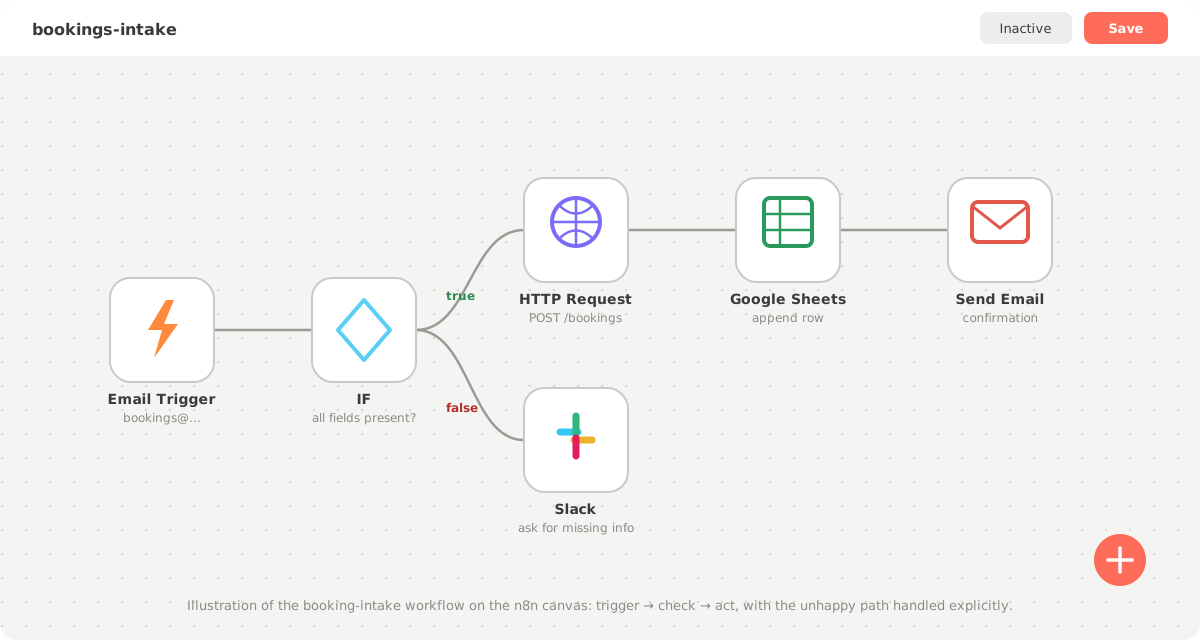
Five nodes and one decision. Let's build it.
Step 1: The trigger
Add an Email Trigger (IMAP) node and point it at the intake mailbox (bookings@yourcompany.com). Every new email starts one execution of the workflow, with the email's subject, sender and body available as data for every later node.
If your requests arrive through a form instead, swap this for a Webhook or Form Trigger node — the rest of the workflow stays identical. That is the quiet power of the pattern: the trigger is an interchangeable front door.
Step 2: Extract and check the fields
A booking needs, say: customer name, pickup date, load type. Add a node that extracts these from the email — for structured emails a Code node with a few regexes works; for free-text emails an AI step extracts fields far more reliably (we cover the exact prompt below). Then add an IF node with the condition "all required fields are present and non-empty".
This single IF node is what most first automations skip, and it is why they break. Real input is incomplete. Give the unhappy path its own branch from day one.
Step 3: The happy path — enter, log, confirm
On the IF node's true branch, chain three actions:
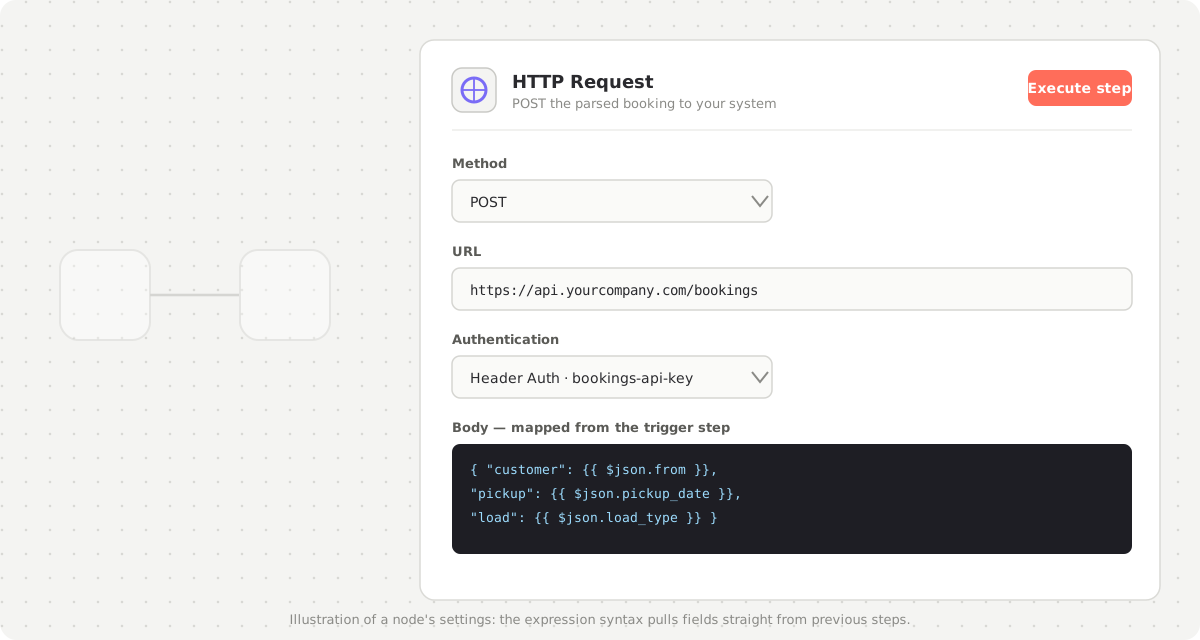
- HTTP Request — POST the parsed booking to your planning system's API. This is where n8n meets your real systems.
-
Google Sheets — append a row as a simple human-readable log (optional, but teams love having it during the trust-building phase).
-
Send Email — the confirmation back to the customer, from a template, with the booking details filled in.
Step 4: The unhappy path — ask, don't drop
On the false branch, add a Slack node (or another Send Email node) that messages the customer or your team with exactly which fields are missing. "Please reply with the pickup date" beats "your request could not be processed" — and it beats silence, which is what the manual process produced when someone was away.
The data model: items, expressions, and the trap everyone falls into
Understanding one concept prevents 80% of n8n debugging sessions: nodes do not pass "a value" to each other — they pass a list of items. One email in, one item. A "list open deals" step, thirty items. Every node after it runs its logic once per item.
Expressions are how you reach into that data. Every field in a node can be a fixed value or an expression in double curly braces:
{{ $json.from }}              → field "from" of the CURRENT item, from the previous node
{{ $json.pickup_date }}       → a field your extraction step produced
{{ $node["Parse booking fields"].json.load }}  → reach back to a named node's output
{{ $now.minus(7, 'days') }}   → dates and simple logic work inline
Click into any field, switch to Expression mode, and n8n shows you the live data from the last execution on the left — you map by clicking, not guessing. $json always means "the output of the previous node, for the item currently being processed."
Now the classic trap: it worked with one item and broke with three. You test with a single email — everything behaves. In production, the trigger fires while three emails sit unread, the workflow receives three items, and suddenly: the confirmation email goes out three times with the first booking's details, or the HTTP node posts item one's customer with item three's pickup date. The cause is almost always one of these:
- A Code node that read
items[0]instead of mapping over all items — return one output item per input item, always. - An expression that reached back to a specific node with
$node[...].json— that syntax grabs the matching item only when item counts line up; when an IF node filtered the list in between, they don't. - A merge of two branches with different item counts, pairing by position when it should pair by a key.
The fix is a habit, not a trick: always test with at least three items, one of them deliberately broken. Pin that multi-item input (next section) and you will catch positional bugs before your customers do.
Credentials hygiene
Never paste API keys into node fields. n8n has a credentials store: create a credential once, and nodes reference it by name. Credentials are encrypted at rest and are not included when you export a workflow as JSON — so you can share workflow files without leaking keys. Beyond that:
- One credential per service, scoped to least privilege. The booking API key can create bookings — not administer the system. The Sheets credential reaches the log spreadsheet — not your whole Drive.
- Service accounts, never personal ones. A workflow authenticated as "Lena's Google account" dies the day Lena changes her password, enables MFA, or leaves. Create
automation@yourcompany.comor proper machine accounts, owned by the company. - Rotate on departure and on schedule. When anyone with editor access leaves, rotate the keys their access could have exposed. Calendar a lightweight annual rotation for the rest — the painful rotation is the one you have never practiced.
- Name credentials by system and scope (
planning-api (create bookings)), so five years of accumulated credentials stay auditable.
Idempotency: a re-run must never double-book
Here is the scenario that separates professionals from demos: the HTTP node posts a booking, the planning system processes it — and the response times out. n8n retries (good!), the booking posts again, and now a truck is booked twice. Automation plus retries without idempotency is a duplicate-generating machine.
The principle: every write carries a dedupe key, and re-sending the same key is harmless. In practice, in order of preference:
- Use the target API's idempotency support. Many APIs accept an idempotency key header or an external ID field on create. Derive the key from the source, not from randomness: the email's Message-ID, or a hash of sender + pickup date + load. Same email, same key, no duplicate.
- Upsert instead of create. If the API supports "create or update by external ID", use it — re-runs converge on the same record instead of multiplying.
- Check-then-write as a last resort. A lookup node ("does a booking with this reference exist?") before the create. There is a small race window, but for human-speed processes it is fine.
And on the n8n side: before the first write node, add a dedupe gate — look the Message-ID up in your log sheet or a small table, and stop if it has been processed. Now even a full manual re-run of yesterday's executions is safe, which transforms how calmly you can operate.
Error handling: retries, the error workflow, and the dead-letter pattern
Three layers, use all three:
1. Retries on flaky steps. Any node's settings → "Retry On Fail". For HTTP calls to external APIs: 3 tries with increasing wait between them absorbs most transient failures silently. Only retry steps that are idempotent (see above) — which, now, your writes are.
2. An error workflow. Create a second, tiny workflow that starts with the Error Trigger node and sends a Slack message with the workflow name, failed node, error message and a link to the execution. In your main workflow's settings, set it as the error workflow. Failures now page a human instead of disappearing. An automation that fails loudly is trustworthy; one that fails silently is a liability with a nicer UI.
3. The dead-letter pattern. Alerting is not enough — the item that failed must not be lost. Park it: in the error path (or the error workflow), append the full payload plus the error and timestamp to a dedicated sheet or table — the dead-letter queue. The ops ritual: the queue is checked each morning; items are fixed and re-fed through the workflow (safe, because idempotent), and the row is marked done. Rule of thumb: a failed item is a task for a human, never just a log line.
Cutover checklist — run before flipping any workflow to Active
[ ] Happy path tested with pinned data (3+ items, one per branch)
[ ] Unhappy path produces the "ask for missing info" message, not silence
[ ] Every write has a dedupe key; re-running yesterday's executions is safe
[ ] Retry-on-fail set on external calls (3 tries, increasing wait)
[ ] Error workflow attached and tested (force one failure, see the alert)
[ ] Dead-letter sheet/table exists; a failed item lands there with payload
[ ] Credentials are service accounts, least privilege, named by scope
[ ] Staging copy exists; live workflow matches it
[ ] Shadow week scheduled: human keeps doing the process in parallel
[ ] Owner named: who checks executions and the dead-letter queue, daily
Testing: pinned data and the shadow week
Before activating anything:
- Pin test data. Execute the trigger once with a real sample email, then pin that output (the pin icon on the node). Now you can re-run the whole workflow against the same input while you build — no need to send yourself forty emails. Build a second pinned set with three items, one broken, for the multi-item trap above.
- Test each branch. One execution with complete data, one with a missing field. Watch the data flow node by node in the execution view — n8n shows every node's input and output, which makes debugging unusually pleasant.
- Run a shadow week. Activate the workflow but keep the human doing the process in parallel for a week. Compare outcomes daily: same bookings created, same confirmations sent, exceptions caught? The workflow earns the handover; it doesn't get it by default.
Then flip it to Active. From that moment it runs on the server, not in your editor tab.
Running a fleet: monitoring beyond the first workflow
One workflow is a tool; eight are an estate, and estates need groundskeeping.
- The execution review ritual. Twice a week, five minutes: open Executions, filter to failures, scan durations. Every failure is either explained (and in the dead-letter queue) or investigated now. Trend matters more than count — a workflow that failed twice a month and now fails daily is telling you an upstream API or input format changed.
- Thresholds for health. A practical rule: a workflow above a few percent failure rate for two straight weeks is not healthy, whatever the dashboard color says. Either the input has drifted (fix extraction), the target API has changed (fix the call), or the process itself changed and nobody told the workflow.
- Prune executions data. Keep execution history bounded (n8n supports pruning by age/count) or your database grows until the editor crawls. Keep failures longer than successes.
- When a workflow earns a rewrite: you fear touching it; nobody can explain the middle third; the Code nodes scroll past two screens; or every incident requires the one person who built it. Any two of those — rewrite it against the doctrine above while you still understand it.
AI steps inside n8n
Two distinct uses, do not mix them up.
Structured extraction and classification — AI as a smarter parser. The free-text booking email that regexes can't handle becomes trivial with an LLM node. The prompt that works:
Extract the following fields from the email below. Reply with ONLY a JSON
object, no explanation, using exactly these keys:
- customer_name (string)
- pickup_date (ISO date, or null if not stated)
- load_type (one of: pallet, container, bulk, other, or null)
- missing (array of the keys above you could not find)

Email:
{{ $json.body }}
Parse the reply as JSON in the next node and feed missing straight into your IF condition. Two rules: force a fixed schema with explicit "or null" (never let the model improvise fields), and always validate the JSON parses before using it — route garbage output to the dead-letter queue like any other failure.
Acting and conversing — when the automation must answer questions, act on company knowledge or operate tools conversationally, you have outgrown a node in a pipeline. That is agent territory: an AI assistant connected to your systems through an MCP server, with n8n still handling the triggering and scheduling around it. Pipelines for flow, agents for judgment calls you'd otherwise route to a person.
When n8n stops being enough
n8n carries further than most people expect, but there are honest limits:
- Complex business logic. When your IF nodes nest three deep and the Code nodes grow past a screen, the logic wants to live in real, tested code. A common end state: n8n keeps doing the triggering and notifying, and calls one well-tested API endpoint of yours that holds the logic.
- High volume. Thousands of executions per hour need queue-mode setup and real infrastructure thinking — doable, but at that point compare the effort honestly against a custom service.
- Versioning and review. Workflows are JSON blobs; code review and git history are awkward (exporting JSON into a repo helps, but diffs are noisy). For automations that move money or touch customers at scale, that matters.
- Understanding unstructured input at depth. Extraction prompts carry far; conversations and multi-step judgment belong to agents via MCP, as above.
The pattern we recommend: n8n for the plumbing, custom code for the brains, AI for the language. Each piece does what it is best at.
Where to go from here
Build the one workflow. Run the shadow week. Then look at your process map for the next handoff — the second workflow takes a third of the time, because the trigger-check-act-confirm pattern repeats everywhere: inquiries, invoices, onboarding, follow-ups. Keep the doctrine as you go, and your tenth workflow will be as legible as your first.
Copy & paste
Do it: the full prompt
Copy this prompt into any LLM or coding agent (Claude, ChatGPT, Cursor …) to apply this guide to your own project.
Guide: https://blackcard.dev/guides/how-to-automate-workflows-with-n8n
Markdown version (fetch this for the full method): https://blackcard.dev/guides/how-to-automate-workflows-with-n8n.md

Act as my n8n automation engineer. Following the method from BlackCard's guide "How to Automate Workflows with n8n" (trigger → validate → act → confirm → explicit unhappy path; one workflow one job; idempotent writes via dedupe keys; retries with backoff; an error workflow plus a dead-letter queue; least-privilege service-account credentials; pinned-data testing with 3+ items including a broken one; shadow week before cutover), build a plan I can execute today.

My process: [describe what arrives, from where, roughly how often]
Required fields per request: [list them]
Input format: [structured / free text — free text means an AI extraction step]
Target system(s): [where the data must end up — tool name or API, and whether it supports external IDs or upserts]
Confirmation: [what the sender should receive back]
When fields are missing: [who gets asked, via which channel]
Hosting: [n8n cloud / self-hosted Docker — include data-residency constraints if any]

Produce:
1. The exact n8n node list in order, with node types, names and key settings — including the unhappy branch
2. The expressions to map fields between nodes (double-curly-brace syntax), written to be safe with multiple items
3. The dedupe key design so any re-run is harmless, and where the dedupe gate sits
4. The credentials to create: service accounts, least-privilege scope, naming
5. The error workflow (Error Trigger → alert with execution link) and the dead-letter sheet/table columns
6. If input is free text: the extraction prompt with a fixed JSON schema and null handling
7. The cutover checklist: pinned-data cases per branch, forced-failure test, shadow-week comparison, and who owns the daily dead-letter review
Ask me for anything unclear before producing the plan.
If you would rather hand the whole thing to someone who has built this pattern dozens of times — mapping the process, building the workflows, setting up the hosting, the error handling and the monitoring ritual — that is exactly what we do at BlackCard with our smart workflows work. Book a free call and bring your messiest intake process.