



The Hidden Cost of Manual Handoffs: Where Your Team's Week Goes
Copying data between tools, chasing approvals, forwarding files — manual handoffs quietly consume hours every week. Here is how to find them, measure them and automate the right ones.

Ask a team where their week goes and you will hear about meetings. But when we actually map how work moves through a company, meetings are rarely the biggest leak. The biggest leak is the space between tools and between people: the handoffs.
A handoff is every moment where work stops until somebody moves it along. A request arrives by email and someone retypes it into the project tool. A contract is signed and someone remembers — or forgets — to tell accounting. A file is exported from one system and imported into another. None of these steps takes long on its own. Together, they are often a hidden part-time employee.
Why handoffs are invisible
Manual handoffs escape attention for three reasons:
- They are small. Two minutes here, five minutes there. Nobody books "retyping things" in a time sheet.
- They feel like work. Moving information around produces a sense of activity. Busy is not the same as productive, but it feels identical from the inside.
- The cost shows up elsewhere. The real damage is rarely the minutes spent — it is the waiting, the dropped balls and the errors. A deal that waits three days for an internal handoff feels like a slow customer, not a slow process.
That last point matters most. When a step depends on someone remembering to do it, the failure mode is not "slower" — it is "sometimes it just doesn't happen."
How to find your expensive handoffs
You do not need a consulting engagement to find the leaks. Take one core process — from "customer asks" to "customer has" — and write down every step on a single page. Then mark three things:
- Every tool switch. Each time information leaves one system and enters another by hand.
- Every wait for a person. Each point where work sits until somebody notices, approves or forwards it.
- Every re-entry. Each piece of information that gets typed more than once.
Now put rough numbers on it: how often the process runs per week, and how long the marked steps take, including the waiting. Most teams are surprised twice — first by how many marks are on the page, then by the multiplication.
A worked example: one booking process, mapped
Here is the actual one-page map from a logistics client of ours, before automation. The process: a customer requests a transport booking. Nine steps, with the marks inline:
- Booking request arrives in the shared inbox — [wait: until someone checks the inbox, 0–4 hours]
- Dispatcher reads the email and extracts route, date, cargo type and contact — (~2 min)
- Dispatcher retypes those fields into the planning tool — [tool switch] [re-entry] (~4 min)
- Missing information? Dispatcher writes back and the request parks in a "waiting" folder — [wait: 1–3 days, nobody tracks it]
- Dispatcher writes a confirmation email by hand, copying details back out of the planning tool — [tool switch] [re-entry] (~3 min)
- Dispatcher sets a calendar reminder for the follow-up documents — [tool switch] (~2 min)
- Reminder fires; dispatcher checks whether documents arrived — [wait + tool switch] (~2 min)
- Documents missing? Chase email, new reminder — [wait: another 1–2 days]
- Documents arrive and get filed; booking is marked complete — (~2 min)
The honest arithmetic, with the client's own numbers:
- 38 bookings per week × ~11 minutes of marked manual work = roughly 7 hours per week. Call it a full working day.
- Over a year: ~350 hours — nearly nine working weeks of one person's time spent moving information that already existed.
- The error cost on top: about one booking in twenty had a typo from re-entry (wrong date, wrong reference), each costing 30–60 minutes of cleanup and an awkward customer call.
- The waiting cost: when the dispatcher was sick or on holiday, bookings simply waited. Two customers mentioned it in the annual review. That number never appears in any time sheet.
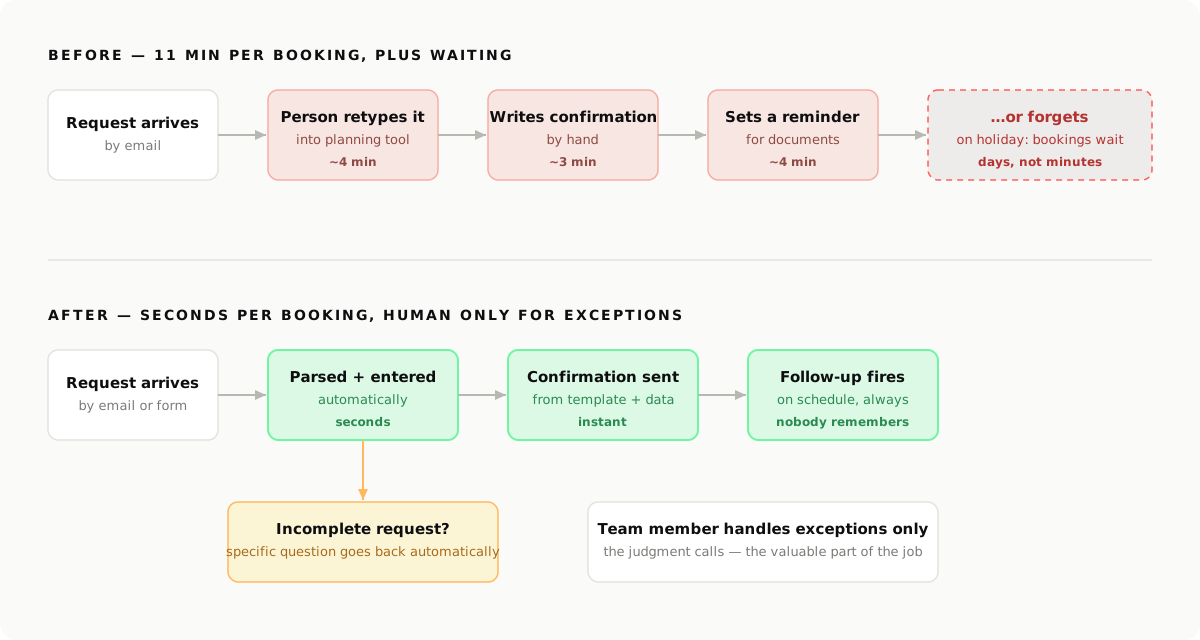
The automated version of the same process: requests get parsed and entered automatically, confirmations go out from a template filled with the parsed data, incomplete requests trigger a specific question back to the customer, and follow-ups fire on schedule without anyone remembering. The dispatcher now touches only the exceptions — the unusual cargo, the special-price negotiation — which was the valuable part of the role all along.
What to automate first (and what to leave alone)
Not every handoff should be automated. The rule of thumb we use with clients:
Automate the movement, keep the judgment.
Moving data between systems, notifying the next person, generating the standard document, checking whether information is complete — these are movement, and software does them better than people. Deciding whether to approve the discount, how to respond to an unusual request, whether the deal is worth it — that is judgment, and it should stay human. The automation's job is to make sure the judgment call arrives prepared, with everything attached.
Start with the handoff that scores highest on frequency times pain. It is usually one of these:
- Incoming requests (email or form) that get manually copied into an internal tool
- Status updates that one person constantly asks another person for
- Documents assembled by hand from data that already exists in a system
- A follow-up that depends on someone remembering
Picking the tooling: glue tools vs. custom code
Once you know what to automate, the how has two sensible answers — and the right one depends on the shape of the work, not on fashion.
Workflow glue tools (n8n, Make, Zapier) are the right starting point when the automation connects standard SaaS tools with straightforward logic: "when X happens in tool A, do Y in tool B." They are quick to build, visible to non-developers, and cheap to change. n8n in particular is a strong default for businesses that want to self-host and keep data in-house.
Custom code becomes the better answer when one of three things is true: the logic has real branching and edge cases (glue-tool canvases turn into spaghetti), the volume is high enough that per-task pricing hurts, or the automation touches your own product and needs proper testing, versioning and error handling. Many of our projects end up hybrid: n8n for the orchestration, one small custom service for the step that needs real logic.
Concretely, the booking automation above looks like this as a flow — trigger by action:
Trigger:  new email to bookings@company.com
Step 1:   AI parse — extract route, date, cargo type, weight,
          contact, reference into structured fields
Step 2:   completeness check — all required fields present?
  ├─ no:  send templated question back to the customer,
          naming exactly the missing fields; park with a
          3-day auto-reminder; alert #dispatch in Slack
  └─ yes: continue
Step 3:   create booking record in the planning tool (API)
Step 4:   send confirmation email from template, filled with
          the parsed fields
Step 5:   schedule follow-up: documents due 5 days before
          pickup; chase automatically at due date
Step 6:   post a one-line summary to #dispatch with a link
          to the record
Every step in that list used to be a person. The person now gets step 2's exceptions and nothing else.
The compounding effect
The first automated handoff saves hours. The real payoff is what happens afterward: once requests, confirmations and follow-ups flow on their own, you get something you never had before — a process you can see. Every step leaves a trace, so you suddenly know how long things take, where they pile up and what to fix next.
That is the quiet secret of workflow automation. It is not really about saving minutes. It is about turning "I think it works like this" into a system you can inspect and improve.
If you want to find out what your handoffs actually cost, we do exactly this mapping with clients — one core process, one page, real numbers, and a clear recommendation on what to automate first. Book a free call with BlackCard and bring your messiest process.