





What Practical AI Actually Means: AI Helpers Teams Use Every Day
Most AI projects die as demos. Here is what practical AI looks like in a real business: support assistants, knowledge search, draft generation and guided workflows that people actually use.

Every week a business owner tells us some version of the same story: "We know we should be doing something with AI, but we don't know what." Usually someone on the team has tried a chatbot, built a demo, shown it around — and then nothing. The demo never became a tool. The tool never became a habit.
That gap between demo and habit is exactly what we mean when we say practical AI. Not a moonshot, not a research project, not a chat window bolted onto your website. A small set of helpers that your team opens every day because they genuinely save time.
Why most AI projects stall
AI pilots fail for predictable reasons, and almost none of them are about the model.
- They start from the technology, not from a task. "Let's use AI" is not a goal. "Let's stop spending four hours a week answering the same twelve support questions" is.
- They live outside the tools people already use. If your team works in email, Slack and a CRM, an AI helper that requires a separate login will be forgotten within two weeks.
- Nobody owns the output. An AI draft that nobody reviews becomes noise. An AI answer that nobody can correct becomes a liability.
- They try to automate judgment instead of preparation. The best AI helpers do the gathering, sorting and drafting — and leave the decision to a person.
If you have a stalled AI pilot somewhere in your company, it almost certainly tripped over one of these four. The fix is not a better model. It is a better-chosen task.
The four AI helpers that actually stick
Across our client work, four patterns come up again and again. They are unglamorous, and that is precisely why they work.
1. Support assistants that answer from your knowledge
Not a generic chatbot — an assistant that has read your help articles, your past tickets and your product documentation, answers the questions it is confident about, and hands everything else to a human with the context already gathered. The win is not replacing your support team; it is removing the repetitive half of their inbox.
2. Knowledge search across your own documents
Most companies have the answer to almost every internal question — spread across old emails, PDFs, wikis and someone's head. A knowledge search assistant lets your team ask in plain language and get an answer with the source linked. New employees stop interrupting senior people for things that are written down somewhere.
3. Draft generation inside existing workflows
Quotes, follow-up emails, reports, product descriptions, meeting summaries. The pattern is always the same: the AI produces a solid first draft from your data and your templates, a person reviews and sends. Teams that adopt this well report the same thing — the blank page disappears, and the review takes a fraction of the original writing time.
4. Guided workflows
This is the quiet one nobody markets. An AI step inside a normal business process: incoming requests get classified and routed, documents get checked for missing information before a human ever sees them, data gets extracted from invoices and filled into the system. No chat interface at all — just fewer manual steps.
Here is what that looks like for one common case, invoice data extraction. The manual version has six steps:
- Open the email attachment
- Read the invoice and find supplier, date, amount, tax rate and due date
- Type those fields into the accounting tool
- Double-check the numbers against the PDF
- Save the PDF into the right folder with the right naming scheme
- Mark the email as processed
The guided-workflow version has two:
- Forward the email to a dedicated address (or let a rule do it)
- Review the pre-filled entry the AI created — fields extracted, PDF filed, anything ambiguous highlighted for you
The person still approves every entry. They just stopped being the typist.
A concrete walkthrough: setting up a support assistant
Because the support assistant is the most common first project, here is the actual setup, step by step — the same shape we use with clients.
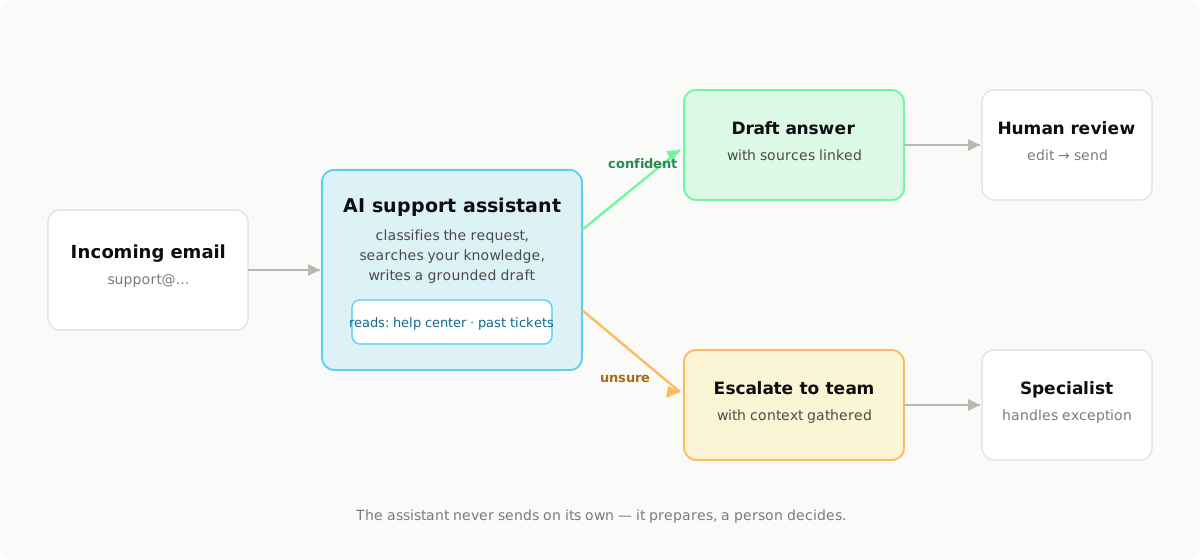
Step 1: Collect the knowledge it will answer from
The assistant is only as good as what it reads. Gather three things:
- Your help center or FAQ articles — even if they are outdated; you will fix the worst ones in step 4.
- The last 50–100 answered tickets — real questions with the answers your team actually gave. This is the most valuable source, because it captures tone and the questions your docs never covered.
- Product documentation — pricing rules, feature limits, policies on refunds and shipping.
If something important exists only in a colleague's head, write it down now as a one-page note. Ten such notes typically cover a surprising share of the inbox.
Step 2: Write the standing instructions
The assistant gets a fixed set of instructions it applies to every request. Keep them short, concrete and honest about limits. A real example, trimmed:
You are the support assistant for <Company>. You help draft replies
to customer emails.

Rules:
- Answer ONLY from the provided knowledge sources. If the sources
  do not cover the question, say so and escalate — never guess.
- Always cite which article or past ticket your answer is based on.
- Tone: friendly, short sentences, no corporate filler. Write in
  the customer's language (German or English).
- Never make commitments about refunds, discounts or delivery
  dates. Draft the factual part and flag the commitment decision
  for the team.
- If the customer is angry or mentions legal action, escalate
  immediately with a one-paragraph summary.
That document is also where the assistant improves over time: every correction your team makes becomes a new rule or a new knowledge note.
Step 3: Give it exactly two tools
Resist the urge to give the assistant many abilities. The first version needs two:
- search_knowledge — looks up your articles, tickets and notes, and returns the most relevant passages with their sources.
- create_escalation — hands a request to a human, with the category, a short summary, the customer history it found and its best guess attached. An escalation with context is answered in a fraction of the time of a raw forwarded email.
Notably absent: a "send" tool. The assistant drafts; a person sends.
Step 4: Roll it out in shadow mode first
The rollout plan that works, week by week:
- Week 1 — shadow mode. The assistant drafts answers to every incoming ticket, but nobody sends them. The team compares drafts against what they would have written, and you log where it was wrong and why. Most errors trace back to missing or outdated knowledge — fix the articles, not the AI.
- Week 2 — one category live. Pick the highest-volume, lowest-risk category (order status, opening hours, "how do I reset my password"). Drafts for that category go into the normal queue for review-and-send.
- Week 3 — expand categories. Add the next two categories. Keep everything behind human review.
- Week 4 — measure and decide. Look at the numbers and decide what earns more autonomy, what stays reviewed, and what the assistant should never touch.
Step 5: Measure the boring numbers
Three metrics tell you whether it is working:
- Draft acceptance rate — the share of drafts sent with no or minor edits. Healthy setups reach 70–85% on the live categories within a month.
- Time to first response — this usually drops the most, because drafts are waiting when the team opens the queue.
- Escalation quality — ask the team one question weekly: "were the escalations prepared well enough to answer quickly?" If not, the context-gathering needs work.
The whole setup above is one to three weeks of real work depending on how scattered the knowledge is — not a six-month AI program.
How to pick your first project
If you want AI that survives contact with daily business, pick the first project with three filters:
- Frequency — the task happens at least weekly, ideally daily. A monthly task will never build a habit.
- Tolerance — a decent-but-imperfect result is still useful, because a person reviews it. First drafts, suggestions and routing all qualify. Final legal answers do not.
- Grounding — the information the AI needs already exists in your systems. If the knowledge lives only in someone's head, write it down first.
A task that passes all three filters is a strong candidate. A task that fails two of them is a demo waiting to die.
Start smaller than feels impressive
The most successful AI rollout we have seen started with a single helper that drafted responses to one category of customer email. It was reviewed by one person. It saved perhaps 45 minutes a day. Within three months, the same pattern had spread to five other processes — because the team trusted it, understood it and asked for more.
That is practical AI: small, grounded, owned by someone, and inside the tools your team already uses. The compounding happens on its own.
If you want help finding the right first project — mapping your processes, picking the task that passes the three filters and building the helper around it — that is exactly what we do at BlackCard. Book a free call and we will look at your workflows together.